KitchenOS runs your whole commissary — pull orders, production scheduling, costed recipes and live inventory — so every outlet gets what it ordered and every peso of food cost is accounted for. Enterprise-grade control, without an enterprise-grade ERP rollout.
A growing multi-brand kitchen is forced to choose between a million-peso food-ERP that takes two years to roll out, restaurant inventory apps that only understand a single outlet, or the spreadsheets-and-Viber reality that breaks the moment two outlets order at once. KitchenOS is purpose-built for the middle — the commissary that needs real recipe costing, real inventory and real traceability, right-sized for an SME and owned outright instead of rented.
Not a generic ERP with a food bolt-on. Every module is shaped around how central-kitchen operations really run.
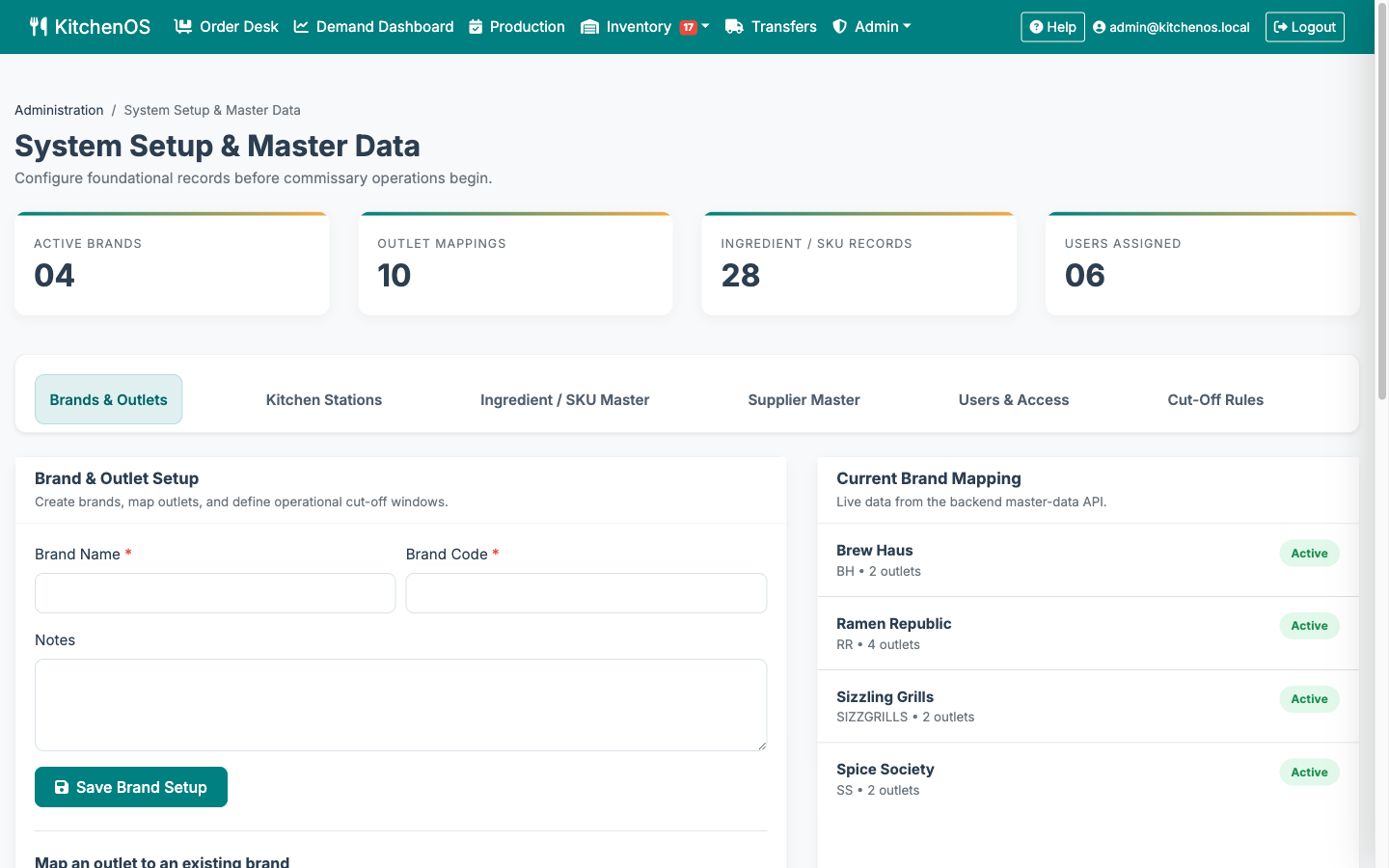
Manage every brand, outlet and kitchen station from one workspace. Per-brand cut-off rules, outlet-scoped roles and master data kept consistent across the whole operation.
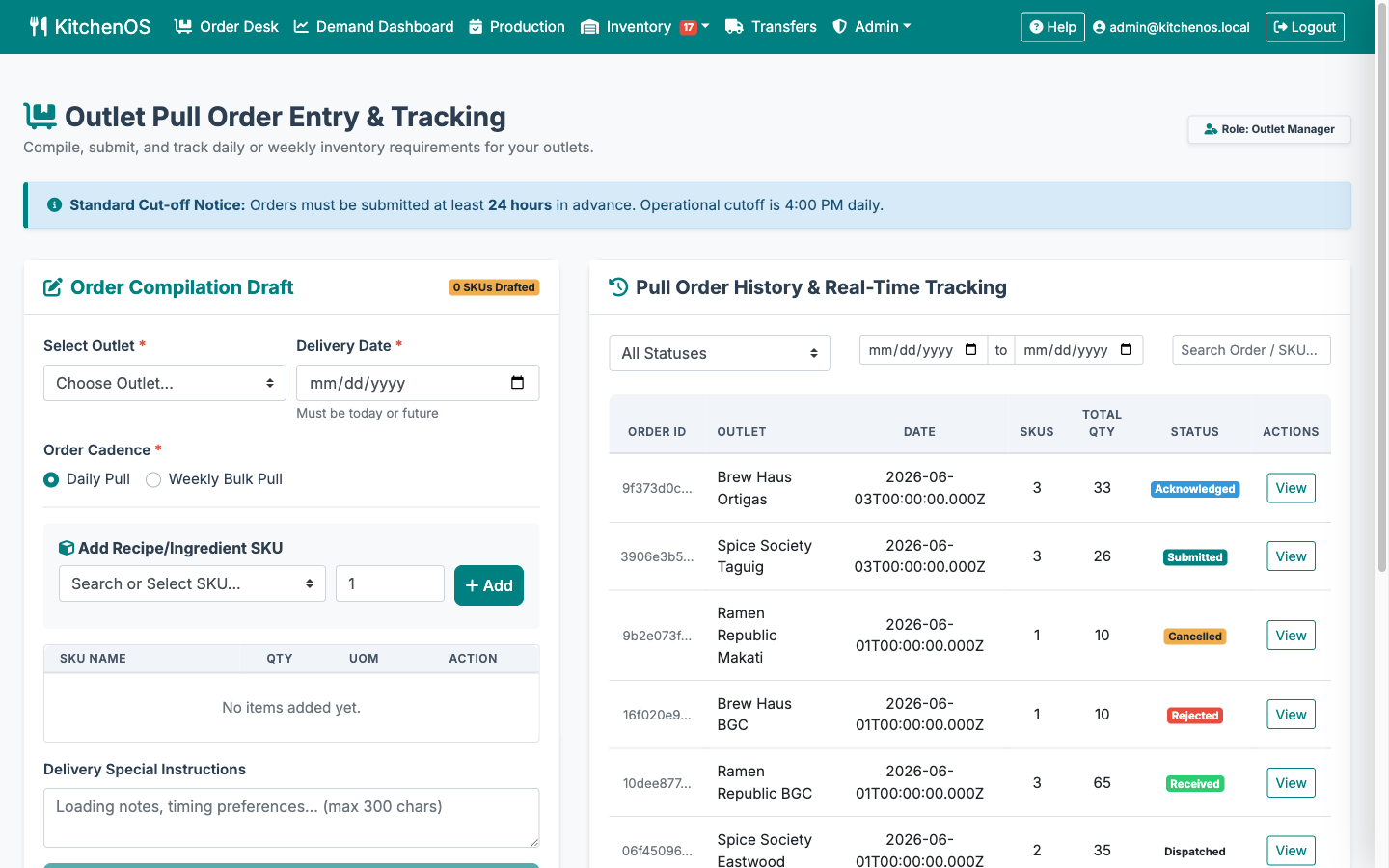
Outlets submit pull orders before cut-off; the commissary acknowledges, rejects with reason or edits quantities. Orders flow Submitted → Acknowledged → In Production → Dispatched → Received with a full audit trail.
Book kitchen slots and schedule production runs against real capacity. Conflict detection prevents double-booking; record batch yields to close the loop between demand and supply.
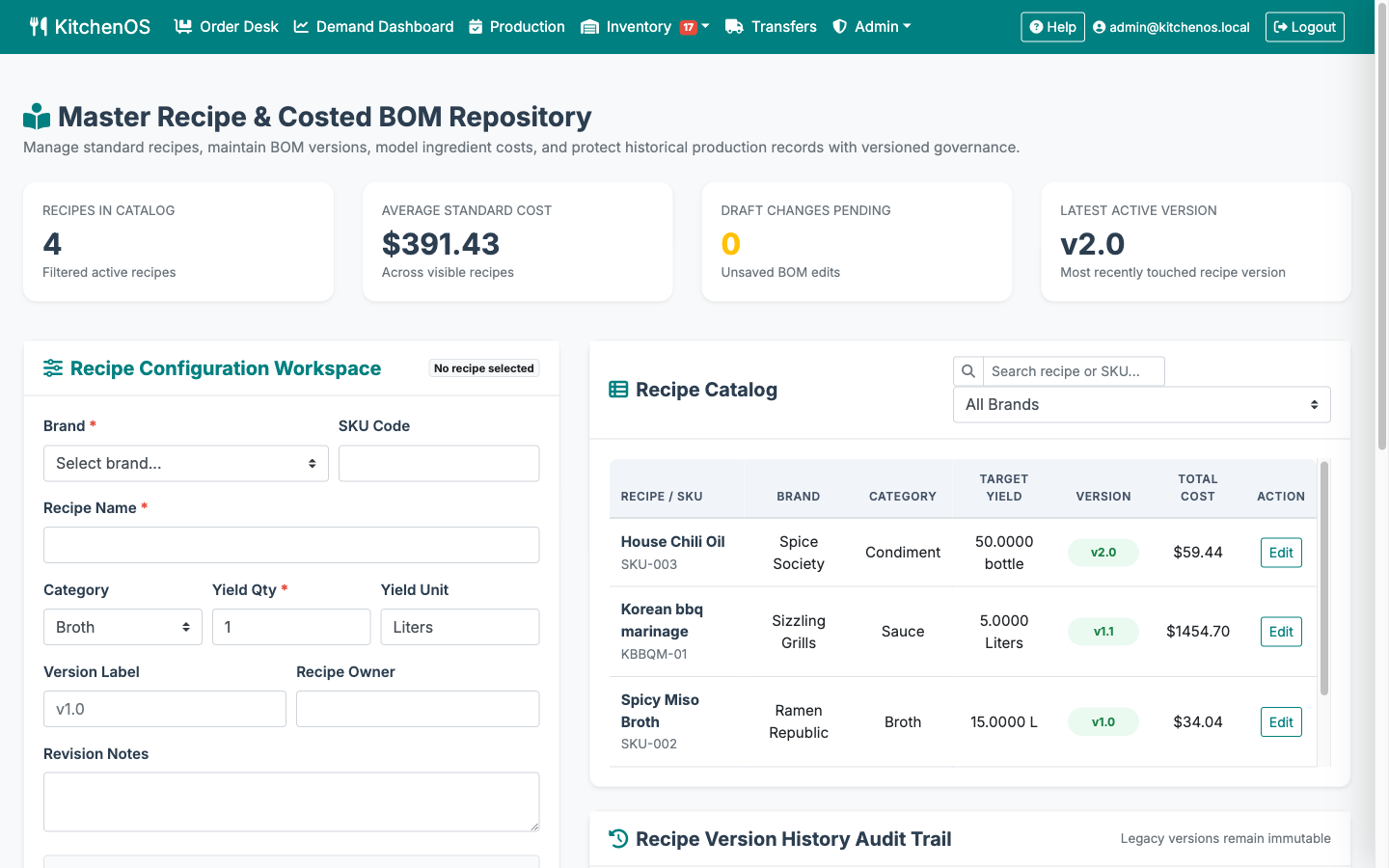
Build versioned recipes with ingredient quantities, units and standard costs. KitchenOS calculates batch cost automatically and preserves every prior version for cost history and audit.
Monitor raw-material inventory across locations in real time. Set safety-stock thresholds and KitchenOS raises low-stock alerts before you run out — then triggers reorder requests.
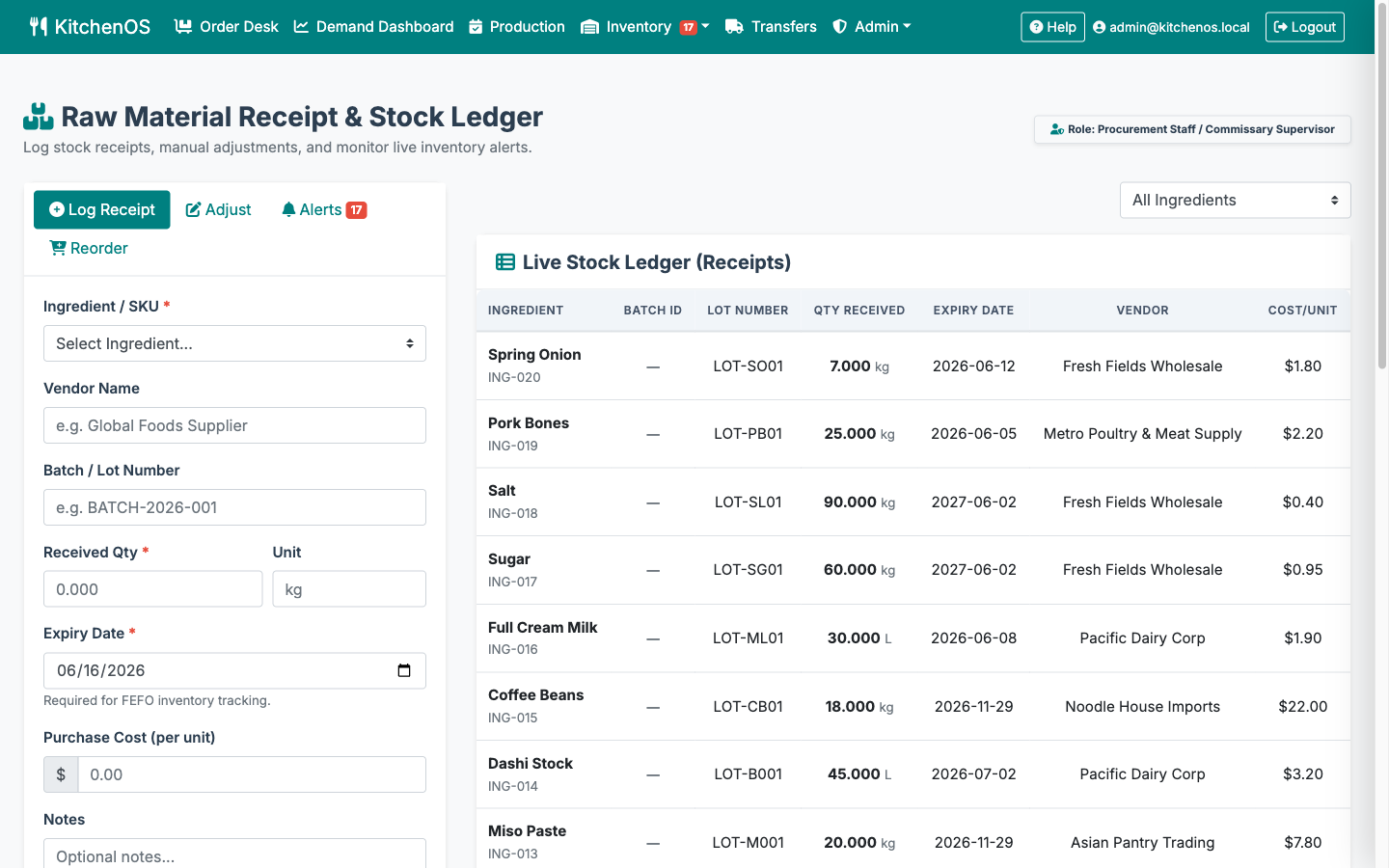
Every receipt is logged with a batch/lot number and expiry date. Quarantine bad batches, expire-first by default, and trace any lot end-to-end — so a recall is a query, not a panic.
Dispatch transfers to outlets with driver details, then let the receiving outlet confirm quantities and flag discrepancies — a clean chain of custody from commissary to counter.
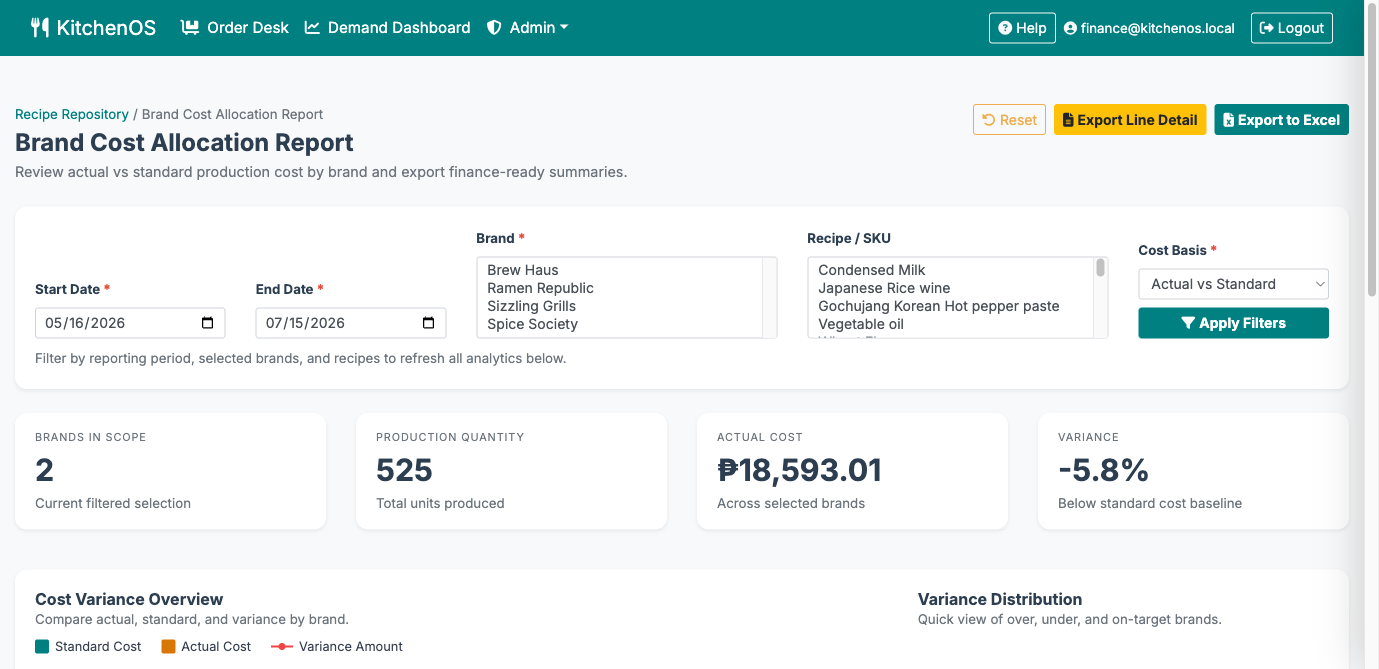
See standard cost vs actual cost per brand with variance reporting, and export finance-ready summaries to Excel — so margin leaks show up before month-end, not after.
Distinct workspaces for admin, finance, brand managers, commissary supervisors, outlet managers and procurement — each scoped to its job, every action captured in an immutable audit log.
Not mockups. Every screen below is live in the KitchenOS demo environment today.
Outlet managers compile pull orders before the brand cut-off; the commissary sees every order and its live status in one tracker — no more reconciling Viber threads against a whiteboard.

Log receipts with batch/lot numbers, expiry dates and purchase cost, then watch active stock update instantly. Quarantine a bad batch and the deduction flows straight through the ledger.

Brands, outlets, kitchen stations, ingredient/SKU master, suppliers, users and per-brand cut-off rules — the foundational records every other module reads from, all backed by the live master-data API.

The Brand Cost Allocation report compares standard cost against actual production cost by brand and recipe, over any reporting period — then exports a finance-ready summary or full line detail to Excel.

Two walkthroughs — one from the outlet's seat, one from the commissary back office.
Outlet experience
The full outlet flow: one-click sign-in, compiling a pull order before cut-off, then tracking it through production, dispatch and receipt in real time.
Platform walkthrough
Every back-office role: master data, demand aggregation, production scheduling, costed BOM, stock ledger and brand cost allocation — all wired to real data from day one.
One click signs you into the real app as that role — no sign-up, no credentials to type.
Full control — master data, every workspace, users and audit log.
Costed BOM, brand cost allocation and finance-ready exports.
Pull orders and demand across the brand's outlets.
Demand aggregation, production scheduling and dispatch.
Submit pull orders and confirm inbound transfers.
Stock receipts, reorder requests and inventory alerts.
Stacked against the four ways multi-brand kitchens run their commissary today.
| Capability | KitchenOS Purpose-built for commissaries | Generic ERP (SAP B1 / NetSuite / Odoo) |
Restaurant inventory apps (MarketMan-style) |
Spreadsheets & group chats |
|---|---|---|---|---|
| Multi-brand, multi-outlet commissary model | ● Built-in | ◑ Heavy config | ✕ Single-outlet | ✕ Manual |
| Pull-order lifecycle with cut-off rules | ● Native | ◑ Custom build | ◑ Basic ordering | ✕ Chat threads |
| Production scheduling & kitchen slots | ● Built-in | ◑ MRP module | ✕ No | ✕ Whiteboard |
| Costed recipes & versioned BOM | ● Auto-costed | ◑ Add-on | ◑ Basic recipe cost | ✕ Manual |
| Batch/lot traceability & FEFO expiry | ● Built-in | ◑ WMS module | ◑ Varies | ✕ None |
| Standard vs actual cost variance by brand | ● Native report | ◑ BI add-on | ✕ No | ✕ Manual |
| Transfer & delivery tracking to outlets | ● Built-in | ◑ Logistics module | ✕ No | ✕ Manual |
| Role-based workspaces & immutable audit log | ● Per-role | ● Yes | ◑ Limited | ✕ None |
| Time to go live | ● Weeks | ✕ 12–24 months | ◑ Weeks–months | ● Immediate* |
| Cost model | ● One-time perpetual | ✕ Licence + integrator | ✕ Per-seat SaaS | ◑ Cheap, then costly |
| Source code ownership & white-label | ● You own & rebrand it | ✕ Vendor-locked | ✕ Vendor's product | ◑ Files only |
| Hosting & data residency control | ● Your infra, any region | ◑ Vendor-defined | ✕ Vendor cloud only | ◑ Your device |
| Commercial model | ● One-time perpetual licence | ✕ Licence + integrator | ✕ Recurring per-seat SaaS | ◑ Cheap, then costly |
● built-in · ◑ partial / requires work · ✕ not available. *Spreadsheets are "free" until the first stock-out, recall scramble or margin surprise. Vendor names are illustrative of each category, not endorsements.
Cloud kitchens, restaurant groups, caterers and food manufacturers get commissary-grade control without an ERP budget or a dedicated IT team.
Pre-built commissary workflows mean you configure brands, recipes and outlets and launch — instead of funding a multi-year ERP integration.
Batch/lot tracking, expiry control and quarantine are wired into the workflow — so traceability and recall readiness are built in, not bolted on.
From a single commissary feeding three outlets to a multi-brand network with dozens — one platform grows with the business.
KitchenOS is not SaaS. Under a source-available license you receive a copy of the source code, brand it as your own, deploy it wherever you choose, and keep full control of your data and your roadmap.
You receive the complete source under a perpetual license. Read every line, audit it, and never be held hostage to a vendor's roadmap or release cadence.
White-label from the ground up — your name, logo, colors and domain across every workspace. Ship it as your operations platform, not ours.
Your cloud, your on-prem server, your region of choice. No mandatory vendor cloud, no per-seat metering, no usage caps that throttle growth.
Recipes, costs, suppliers and operational records sit in infrastructure you own — making Data Privacy Act (RA 10173) compliance and commercial confidentiality far simpler.
Modify and extend the platform for your own brands and workflows. The code is yours to evolve — by your team or ours — as the business grows.
A one-time license to the delivered version, yours to run indefinitely. No subscription that can be switched off, no renewal leverage held over you.
Multiple brands out of one commissary, each costed and tracked independently.
A central kitchen supplying every outlet, with pull orders and transfers in one place.
Recipe costing, production scheduling and batch traceability for high-volume prep.
BOM versioning, lot tracking and FEFO expiry control for compliant production.
KitchenOS pairs decades of business-critical engineering with an AI-powered delivery model — so you get depth and speed, not a trade-off between them.
Implementation partner
For 25 years, BlastAsia has built and implemented business-critical software for global enterprises — bringing deep engineering discipline, domain expertise and delivery rigor to every KitchenOS deployment.
AI-Powered Software Factory
Xamun is an AI-powered software factory that brings speed and reliability to commercial software delivery at scale — compressing what once took years into months, without sacrificing quality.
Book a 30-minute walkthrough, or jump straight into the live demo and click through it as any role.